
Automation as Competitive Advantage: How RPA & Workflow Tools Reduce Admin Burden by 60%
Discover how Robotic Process Automation (RPA) and intelligent workflow tools can reduce administrative burden in family offices by up to 60%. This article explores the scope of manual process burden and provides a roadmap for automation as a competitive advantage.
A family office operations manager sits at her desk on a Tuesday morning, facing what has become her weekly ritual: reconciling capital calls from three different private equity funds. Each call arrives in a different format—one as a PDF, one as an email attachment, one through a fund portal. She downloads each one, manually extracts the wire instructions, cross-references them against the master investor list in a spreadsheet, checks the calculation, and then enters the data into the accounting system. The entire process takes 90 minutes per capital call.
Multiply that by 15-20 capital calls per month, and this single task consumes roughly 30 hours monthly—time that could be spent on analysis, relationship building, or strategic planning.
Meanwhile, in the back office, a junior accountant spends two days per week consolidating bank statements from eight different custodians. Each statement has a different format. She manually downloads each one, reformats the data, loads it into the accounting system, and verifies that it reconciles. If there’s a discrepancy, the hunt begins through email chains and bank websites to identify the error.
This is the hidden reality of most family offices: 25-40% of staff time is consumed by repetitive, manual, rules-based work that doesn’t require strategic judgment—yet is absolutely essential to operations.
What if those processes could be automated?
This article explores Robotic Process Automation (RPA) and intelligent workflow tools that family offices are deploying to reclaim that 25-40% of staff time—not by hiring more people, but by automating the work itself.
The Scope of Manual Process Burden in Family Offices
Before exploring solutions, let’s quantify the problem.
Family Office Process Reality:
According to Family Wealth Report research, family offices spend between 20-40% of working hours per week on manual processes—activities that consume staff time but don’t generate strategic value.
These manual processes include:
- Capital call processing: Receiving notices, extracting data, verifying amounts, coordinating wire transfers, reconciling completions (15-20 calls/month × 90 minutes each = 22.5-30 hours/month)
- Bank reconciliation: Downloading statements from multiple custodians, reformatting data, identifying discrepancies, investigating mismatches (30-50 hours/month)
- Data entry: Transcribing investment information, transaction details, and performance data from custodian systems into the family office’s accounting/portfolio system (20-40 hours/month)
- Expense processing: Receiving invoices, validating against approved expenses, routing for approval, processing payment (5-15 hours/month)
- Compliance reporting: Gathering data from multiple sources, consolidating into compliance templates, generating required reports (30-60 hours/month)
- Document management: Filing, organizing, retrieving documents related to investments, tax, legal (10-20 hours/month)
Total Annual Burden: A typical $500M family office with 8-12 staff members dedicates approximately 150-250 hours annually per staff member to manual, repetitive processes. For a team of 10, that’s 1,500-2,500 hours annually—equivalent to 1 full-time employee doing nothing but busywork.
Cost Impact: At an average all-in cost of $150,000 per family office staff member, this represents $225,000-$375,000 annually in pure operational drag.
What Is RPA? And Why Does It Work?
RPA (Robotic Process Automation) is software that automates repetitive, rule-based tasks—the same way a human would, but faster and without errors.
Unlike AI, which learns from data and adapts, RPA follows explicit rules: “When a capital call PDF arrives, extract the fund name, due date, amount, and wire instructions. Match it against the investor database. If matched, send an email alert to the CFO. If not matched, flag for manual review.”
RPA bots can:
- Read emails and attachments
- Download and upload files
- Extract data from PDFs, web forms, and databases
- Enter data into applications
- Perform calculations
- Coordinate between systems
- Generate reports and send notifications
Key advantage of RPA: It operates on the user interface, the same layer humans use. This means RPA doesn’t require custom software development or deep system integration. RPA works with “legacy” systems that would be expensive or impossible to replace.
Real-World ROI: Documented Results from Family Offices
Let’s look at specific, documented use cases:
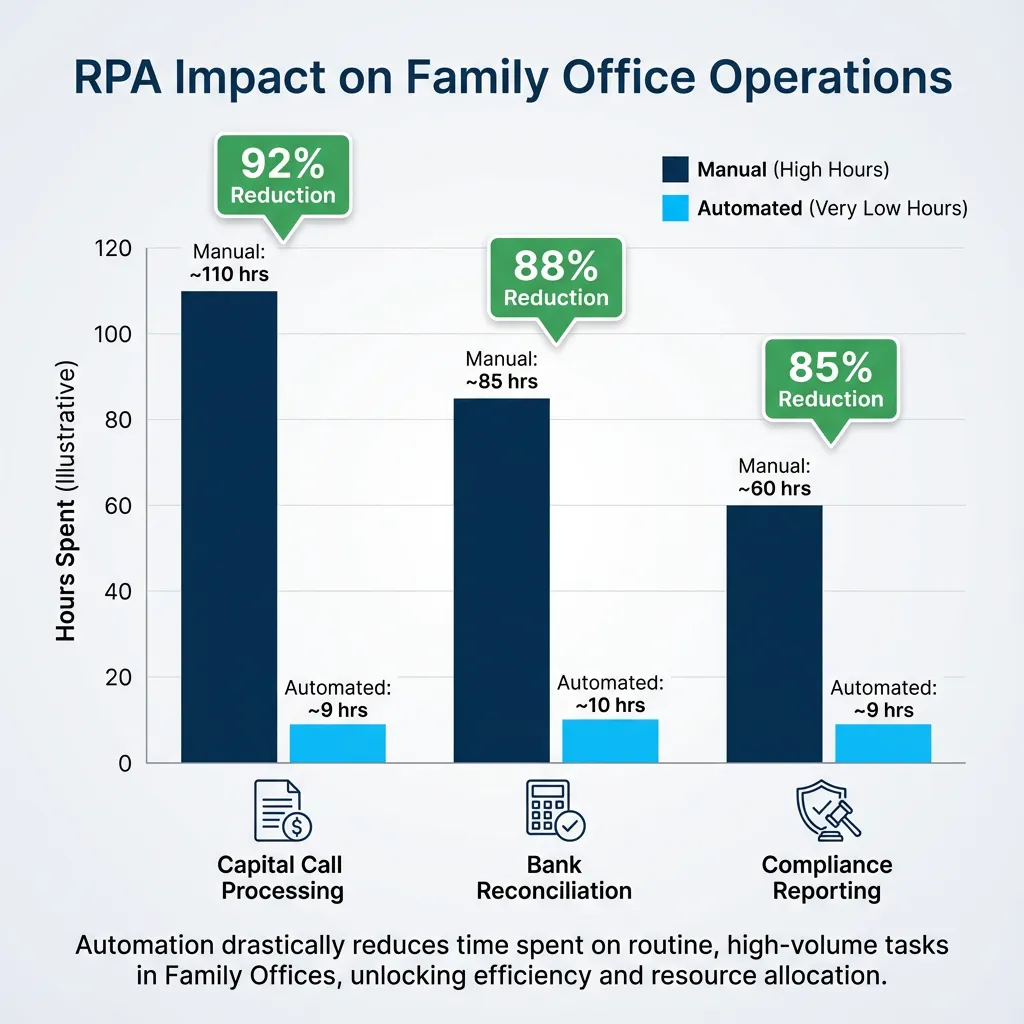
Use Case 1: Capital Call Processing
Before RPA:
- Manual capital call processing: 90 minutes per call
- Calls received: 15-20 per month
- Staff time: 22.5-30 hours/month (270-360 hours/year)
- Error rate: 2-3% (wire address errors, amount mismatches, missed deadlines)
- Cost: ~$54,000-$72,000 annually in staff time
After RPA:
- Automated processing: 3 minutes per call (bot extracts data, validates, sends confirmation)
- Calls processed: 15-20 per month
- Staff time: 0 hours/month for routine calls; 1-2 hours/month for exceptions (12-24 hours/year)
- Error rate: 0.1% (bot precision exceeds human accuracy)
- Cost: ~$2,400-$4,800 annually in oversight
Savings: $51,600-$67,200 annually per office; 92% reduction in processing time
Additional benefit: With instant processing, capital calls are executed within hours rather than days, improving fund manager relationships and ensuring the office doesn’t miss deployment windows.
Use Case 2: Bank Reconciliation
Before RPA:
- Manual statement downloads: 8 custodians × 2 hours/month = 16 hours/month
- Data reformatting and entry: 20 hours/month
- Reconciliation and investigation: 15 hours/month (identifying discrepancies)
- Total staff time: 51 hours/month (612 hours/year)
- Error rate: 1-2% (data entry errors cascade through reconciliation)
- Cost: ~$91,800 annually in staff time
After RPA:
- Automated downloads: Bots log into each custodian portal and download statements (2 minutes per custodian)
- Automated data normalization: Statements are parsed, reformatted, and standardized (5 minutes per statement)
- Automated reconciliation: Transactions are matched against the accounting ledger; discrepancies are flagged with explanations
- Staff time: 0 hours/month for routine reconciliation; 2-3 hours/month for investigating flagged exceptions (24-36 hours/year)
- Error rate: 0.01% (automated matching is more accurate than manual)
- Cost: ~$3,600-$5,400 annually in oversight
Savings: $86,400-$88,200 annually; 92-95% reduction in reconciliation time
Additional benefit: Real-time reconciliation is possible. Rather than monthly statements reconciling three days after period-end, reconciliation happens continuously. Cash position is always current.
Use Case 3: Compliance Reporting
Before RPA:
- Gather data from multiple sources: 20 hours/month
- Consolidate into compliance templates: 15 hours/month
- Generate reports and file: 10 hours/month
- Total staff time: 45 hours/month (540 hours/year)
- Risk: Manual consolidation misses data; reports filed late or with errors
- Cost: ~$81,000 annually in staff time; plus regulatory fine exposure
After RPA:
- Automated data collection: Bots query portfolio system, custodian feeds, and investor database continuously
- Automated report generation: Reports are assembled automatically using templates
- Automated filing: Reports are submitted to regulators automatically when complete
- Staff time: 0 hours/month for routine reporting; 2 hours/month for quarterly reviews (24 hours/year)
- Risk: Zero missed data; reports filed on time with perfect accuracy
- Cost: ~$3,600 annually in oversight
Savings: $77,400 annually; 95% reduction in reporting effort
Additional benefit: Audit readiness improves dramatically. Regulators can see that reports were generated systematically with perfect data accuracy and filed on time.
The Broader Impact: What 60% Efficiency Gains Mean Operationally
According to research from McKinsey and EY, deploying RPA and intelligent automation can reduce operational labor costs by 30-60% while maintaining or improving quality.
For a typical family office, this translates to:
Scenario: $500M Family Office with 10 Staff Members
- Annual operational cost: ~$1.5M (salary + benefits + overhead for 10 staff)
- Time spent on manual processes: 35% (industry norm)
- Annual cost of manual work: ~$525,000
- Realistic efficiency gain from RPA: 60% of manual work eliminated through automation
- Annual savings: $315,000
- Payback period on RPA investment: 6-12 months (typical RPA implementation costs $150,000-$250,000)
- Ongoing annual benefit: $315,000+ in reclaimed staff time and reduced operating costs
More importantly: the 315 hours annually of reclaimed staff capacity can be reallocated to:
- Investment analysis and research
- Family engagement and governance
- Risk management and compliance strategy
- New initiative development
- Vendor management and optimization
Rather than replacing staff, RPA allows offices to accomplish more with existing teams—or maintain current productivity with smaller teams.
RPA Use Cases Perfectly Suited for Family Offices
Not all processes should be automated. RPA works best on processes that are:
- Repetitive (same task, done repeatedly)
- Rules-based (follows explicit logic)
- High-volume (enough frequency to justify automation investment)
- Stable (rules don’t change constantly)
- Multi-system (involves moving data between systems)
High-value RPA opportunities for family offices:
| Process | Frequency | Current Time | RPA Impact | Business Value |
|---|---|---|---|---|
| Capital call processing | 15-20/month | 90 min each | 92% time reduction | Faster execution; improved fund relationships |
| Bank statement reconciliation | Daily | 50+ hrs/month | 95% time reduction | Real-time cash position; fewer errors |
| Custodian statement processing | Daily | 30+ hrs/month | 90% time reduction | Instant consolidated reporting |
| Expense validation and payment | 50-100/month | 20+ hrs/month | 85% time reduction | Faster approvals; audit trail |
| Investor reporting distribution | Quarterly | 40+ hrs | 80% time reduction | Instant delivery; version control |
| Compliance filing | Per deadline | 40-60 hrs | 90% time reduction | Zero missed deadlines |
| Deal document upload/filing | Per transaction | 8-16 hrs | 80% time reduction | Organized knowledge repository |
| Tax document preparation | Quarterly/annually | 60-100 hrs | 70% time reduction | Faster tax season |
Implementation: How RPA Deployment Works
Phase 1 (Weeks 1-4): Process Discovery
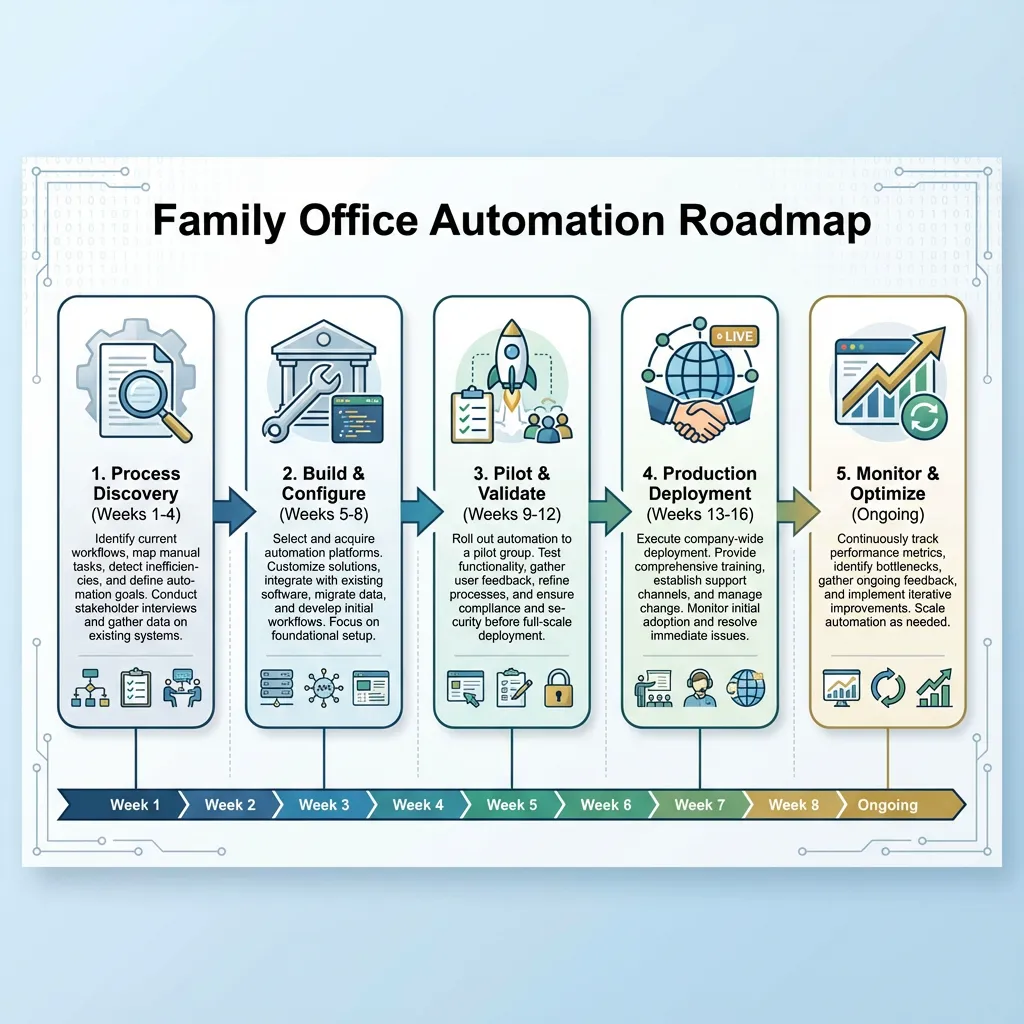
- Identify manual processes consuming the most time
- Document current workflows (how processes actually work, not how they “should” work)
- Prioritize processes for automation (high-frequency, stable, rules-based)
Phase 2 (Weeks 5-8): Build & Configure
- Design bot logic to replicate the manual workflow
- Configure bot to interact with relevant systems (email, custodian portals, accounting software)
- Build error handling (what happens if data is unexpected or a system is unavailable)
- Build audit trail (document everything the bot does for compliance)
Phase 3 (Weeks 9-12): Pilot & Validate
- Deploy bot in controlled pilot environment
- Test on historical data to confirm accuracy
- Have humans validate bot outputs before the bot goes “live”
- Refine bot logic based on pilot learnings
Phase 4 (Weeks 13-16): Production Deployment
- Deploy bot to production environment
- Monitor continuously for errors or unexpected behavior
- Gradually increase bot workload (start with 50% of volume, scale to 100%)
- Establish oversight procedures
Phase 5 (Ongoing): Monitor & Optimize
- Track bot performance metrics (volume processed, error rate, cost savings)
- Adjust bot logic if processes change
- Identify additional processes suitable for automation
Total timeline: 3-4 months from discovery to production deployment
Intelligent Workflow Tools: Beyond RPA
Beyond basic RPA, modern family offices are deploying intelligent workflow tools that combine RPA with structured workflows:
Example: Capital Call Workflow
A capital call arrives as an email. The intelligent workflow:
- Captures the email and extracts the fund name, amount, due date, and wire instructions
- Routes for validation: If the fund is in the database, the system automatically validates the amount and due date. If validation passes, it routes to the CFO for approval. If validation fails, it flags for manual review.
- Executes the decision: Upon CFO approval, the system automatically initiates a wire transfer, logs the transaction, and sends confirmation emails to the fund and internal team.
- Tracks and reports: The system tracks the capital call through execution and reconciliation, feeding into investor reporting and performance analytics.
What this delivers:
- Capital calls processed in minutes (vs. hours)
- Zero data entry errors
- Complete audit trail
- Automatic reconciliation when funds are wired
- Real-time visibility into pending commitments
The Change Management Element: Team Perspective
A critical success factor is how RPA is implemented from a team perspective.
The wrong way: “We’re automating your job away. Some of you will be laid off.” Result: Staff sabotage automation efforts; resistance is high; implementation fails.
The right way: “We’re automating the busywork so you can focus on meaningful work.” Implementation:
- Involve staff in identifying which processes to automate (they know what’s painful)
- Redeploy freed-up capacity to higher-value work (investment analysis, family governance, risk management)
- Invest in training staff to work with the bots and manage automated workflows
- Improve job satisfaction by eliminating tedious work
Result: Staff embrace automation; implementation succeeds; morale improves.
Research shows that when automation is implemented well, employee satisfaction increases because staff shift from repetitive, low-value work to strategic, judgmental work that’s more professionally rewarding.
Building RPA Capability: Make vs. Buy vs. Hybrid
Family offices have three options for deploying RPA:
Option 1: Build In-House
- Hire RPA expertise
- Build and maintain bots internally
- Pros: Full control; bots customized exactly to office needs
- Cons: High cost ($200K-$400K+ annually for RPA engineer); long implementation timeline
- Suitable for: Very large family offices ($2B+) with complex, unique processes
Option 2: Outsource to Vendor
- Vendor designs, builds, and operates bots
- Office pays per-bot or per-transaction fees
- Pros: Low upfront investment; vendor expertise; faster time to value
- Cons: Less control; higher ongoing costs; potential vendor lock-in
- Suitable for: Smaller-medium offices wanting quick wins without internal investment
Option 3: Hybrid (Fractional CTO Model)
- Fractional CTO or outsourced team designs and implements bots
- Office operates bots internally once built
- Pros: Expert guidance; lower ongoing cost than vendor model; reasonable upfront investment
- Cons: Requires some internal capability to operate bots
- Suitable for: Most family offices; balances cost, control, and expertise
The Fractional CTO’s Role: RPA Strategy & Implementation
A fractional CTO partner can:
-
Identify High-ROI Automation Opportunities Assess current processes, calculate time and cost savings potential, prioritize processes for automation.
-
Design Automation Architecture Define which processes are suitable for RPA vs. workflow tools vs. API integration. Design end-to-end workflows.
-
Implement Bots & Workflows Design and build bots or configure workflow tools. Test thoroughly before deployment.
-
Build Team Capability Train staff to operate bots and manage automated workflows. Establish procedures for monitoring and optimization.
-
Measure & Optimize Track automation ROI (hours saved, error reduction, cost savings). Identify additional automation opportunities.
Real Numbers: What This Means to Your Bottom Line
For a typical $500M family office:
Before Automation:
- 10 staff members
- 35% of time on manual processes (1,400 hours/year)
- Cost: ~$315,000 annually in operational drag
- Annual operating cost: ~$1.5M
After Automation:
- 10 staff members (no layoffs; redeployed to strategic work)
- 12% of time on manual processes (480 hours/year)
- Cost: ~$108,000 annually in operational oversight
- Annual operating cost: ~$1.185M
Annual savings: $315,000 Percentage reduction in operating cost: 21%
Over a 5-year period, that’s $1.575M in cumulative savings while improving decision-making speed, reducing errors, and improving team satisfaction.
The Competitive Advantage
Family offices that automate manual processes gain competitive advantage in several ways:
- Faster Decision-Making: Real-time reporting and instant data availability enable faster capital deployment and investment decisions.
- Operational Excellence: Fewer errors, consistent processes, and audit-ready procedures strengthen governance.
- Team Capability: Staff focus on analysis, strategy, and relationship building instead of busywork, attracting better talent.
- Scalability: Offices can add complexity (more investments, more asset classes, more jurisdictions) without proportional increase in staff.
- Cost Efficiency: Operating cost per dollar of assets under management decreases, improving competitive positioning.
Moving Forward: Your Automation Roadmap
- Month 1: Identify manual processes consuming the most staff time
- Month 2: Calculate ROI potential for top 3-5 processes
- Month 3: Select and build RPA/workflow tool for highest-ROI process
- Month 4-6: Deploy and refine automation; measure results
- Month 7+: Scale to additional processes; optimize based on learnings
Expected outcome by Year 1: 30-40% reduction in manual process effort; $200K-$300K in annual savings.
Sources
- Family Wealth Report. “Family Office Efficiency Research.” Available at: https://familywealthreport.com/family-office-efficiency
- McKinsey & Company. “Operations Management, Reshaped by Robotic Automation.” December 2019. Available at: https://mckinsey.com/operations-management-robotic-automation
- EY. “Back Office Automation Tools: Transforming Operations.” Available at: https://ey.com/back-office-automation
- Bob’s Guide. “Why Robotic Process Automation is a Perfect Fit for Family Offices.” March 2024. Available at: https://bobsguide.com/rpa-family-offices
- Asset Vantage. “Family Office Software Solutions for Complex Reporting.” October 2025. Available at: https://assetvantage.com/family-office-reporting-solutions
- IEEE Xplore. “Optimizing Core Banking Operations ROI with RPA.” October 2024. Available at: https://ieeexplore.ieee.org/rpa-banking-roi
- Canoe Intelligence. “To Truly Manage Risk, Alternative Allocators Must Automate.” March 2025. Available at: https://canoeintelligence.com/capital-call-automation
- Altoo.io. “Building a Modern Family Office: The Comprehensive Guide.” September 2025. Available at: https://altoo.io/building-modern-family-office
- ShieldBase.ai. “The Future of Family Offices with AI.” September 2025. Available at: https://shieldbase.ai/future-family-offices-ai
- FundCount. “How Back Office Automation Tools Can Ease Your Daily Life.” October 2023. Available at: https://fundcount.com/back-office-automation-tools
Frequently Asked Questions
Q: What is RPA and how does it work for family offices?
A: Robotic Process Automation (RPA) uses software “bots” to automate repetitive, rules-based tasks like data entry, reconciliation, and report generation. For family offices, RPA automates tasks such as bank account reconciliation (20 hours/week → 2 hours/week), portfolio performance reporting (3 weeks → 2 days), tax document aggregation (40 hours/quarter → 4 hours/quarter), and compliance report generation (80 hours/quarter → 8 hours/quarter). Bots work 24/7 without errors, freeing staff for strategic work.
Q: How much does RPA implementation cost for a family office?
A: Initial RPA implementation costs $50K-$150K for platform licensing and 3-5 automated processes. Annual licensing runs $20K-$60K. For a mid-sized family office, total first-year investment is $70K-$210K. However, time savings of 100-200 hours/month translate to $240K-$480K annually in staff capacity freed for strategic work. Typical payback period is 6-12 months, with 300-400% ROI within 3 years.
Q: What processes should family offices automate first?
A: Prioritize high-volume, repetitive processes with clear rules: (1) Bank account reconciliation and data entry (highest volume, 90% time savings), (2) Portfolio performance reporting and consolidation (2-3 week cycle → 2-3 days), (3) Tax document aggregation and organization (40 hours/quarter → 4 hours), (4) Vendor invoice processing and approval workflows (15 hours/week → 1 hour), (5) Compliance report generation (80 hours/quarter → 8 hours). Start with 1-2 processes, validate ROI, then expand.
Q: Will automation eliminate jobs in family offices?
A: No. Family offices using automation typically maintain headcount while redirecting staff from tedious data entry to strategic work. Instead of layoffs, automation enables: analysts spending more time on investment research vs. data extraction, operations staff focusing on relationship management vs. manual reconciliation, compliance teams conducting risk analysis vs. report formatting, and the office handling asset growth without proportional staff increases. Automation reduces burnout by eliminating tedious work, improving job satisfaction.
About Deconstrainers LLC
Deconstrainers LLC specializes in RPA, workflow automation, and operational efficiency for family offices and private equity firms. Our fractional CTO service helps offices identify high-ROI automation opportunities, design and implement bots and workflows, build team capability, and measure operational improvements.
Is your family office drowning in manual processes? Schedule a free 30-minute Automation Opportunity Assessment to identify processes costing you the most time and money, and design a roadmap to reclaim 25-40% of staff capacity through strategic automation.
Everything you need to know
What is RPA and how does it work for family offices?
Robotic Process Automation (RPA) uses software "bots" to automate repetitive, rules-based tasks like data entry, reconciliation, and report generation. For family offices, RPA automates tasks such as bank account reconciliation (20 hours/week → 2 hours/week), portfolio performance reporting (3 weeks → 2 days), tax document aggregation (40 hours/quarter → 4 hours/quarter), and compliance report generation (80 hours/quarter → 8 hours/quarter). Bots work 24/7 without errors, freeing staff for strategic work.
How much does RPA implementation cost for a family office?
Initial RPA implementation costs $50K-$150K for platform licensing and 3-5 automated processes. Annual licensing runs $20K-$60K. For a mid-sized family office, total first-year investment is $70K-$210K. However, time savings of 100-200 hours/month translate to $240K-$480K annually in staff capacity freed for strategic work. Typical payback period is 6-12 months, with 300-400% ROI within 3 years.
What processes should family offices automate first?
Prioritize high-volume, repetitive processes with clear rules: (1) Bank account reconciliation and data entry (highest volume, 90% time savings), (2) Portfolio performance reporting and consolidation (2-3 week cycle → 2-3 days), (3) Tax document aggregation and organization (40 hours/quarter → 4 hours), (4) Vendor invoice processing and approval workflows (15 hours/week → 1 hour), (5) Compliance report generation (80 hours/quarter → 8 hours). Start with 1-2 processes, validate ROI, then expand.
Will automation eliminate jobs in family offices?
No. Family offices using automation typically maintain headcount while redirecting staff from tedious data entry to strategic work. Instead of layoffs, automation enables: analysts spending more time on investment research vs. data extraction, operations staff focusing on relationship management vs. manual reconciliation, compliance teams conducting risk analysis vs. report formatting, and the office handling asset growth without proportional staff increases. Automation reduces burnout by eliminating tedious work, improving job satisfaction.